
Updated: July 2026.
Facebook’s page verification process has changed dramatically since I first wrote this guide. The old process where you called a phone number, entered a code, and moved on? Mostly gone. Meta rebuilt the entire system around identity verification, notability requirements, and a paid subscription tier.
If you’re a small business trying to verify your Facebook Business Page today, here’s what actually works and what to expect.
Why Facebook Business Page Verification Still Matters
The core reasons haven’t changed much, but the stakes are higher now.
Verified pages still rank higher in Facebook’s internal search. Your page still signals authenticity to potential customers. And maintaining your basic listing is still free.
What has changed is that fake pages and impersonation have gotten worse, not better. If you’re a local business with a real reputation to protect, verification is no longer optional. It’s basic digital hygiene.
Verification also plays into how Meta’s algorithm surfaces your content. A verified page carries more weight in recommendations, search results, and ad eligibility for certain industries like financial services.
Verification works best when it supports a broader digital marketing plan that keeps your website, social profiles, advertising, and local listings aligned.
The Two Facebook Verification Paths in 2026
Meta now offers two distinct ways to get verified. Understanding the difference before you start will save you time and frustration.
Path 1: Traditional Verification (Free)
This is the original verification process, updated and tightened considerably. Still available, but harder to get approved than it used to be.
The free path requires you to demonstrate that your page is authentic, complete, and notable. That last part is where most small businesses get stuck.
To apply for free verification:
Go to Meta Business Suite. Look for the “Become a Verified Business” option and click Get Started. Choose the page you want to verify. Upload official documentation like a business license, tax filing, articles of incorporation, or utility bill showing your business name and address. You’ll also need to confirm your “notability” by providing links to up to five sources that show public interest in your business. Think press mentions, directory listings with traffic, or your official website.
Once you submit, the process is largely automated. If you don’t meet the criteria, you’ll often get rejected immediately. If your application moves forward, approval can take anywhere from 48 hours to 45 days. If rejected, you can try again in 30 days.
What counts as “notable”:
Meta keeps this intentionally vague. But from what I’ve seen working with clients, you’ll want at least a functioning website with SSL, a presence in legitimate local directories, and ideally a mention or two in local news or industry publications. A chamber of commerce membership page counts. An article in your local business journal counts. Your own blog does not.
Common reasons for rejection:
Your website doesn’t load, lacks SSL, or returns errors. Your uploaded documents don’t match the business name on your page. Your “notability” links are all self-promotional. Your page has no recent activity or content.
Meta may use your website as one signal that your business is legitimate, so make sure it is secure and understand why your website needs an SSL certificate.
If your site has technical issues, fix those first. I’ve written about how technical problems quietly undermine everything in my technical SEO checklist.
Path 2: Meta Verified (Paid)
Meta Verified is the subscription-based verification option. It launched in 2023 and has expanded significantly since then.
Pricing starts at $11.99 per month if you subscribe through the web, or $14.99 per month through the mobile app. Business plans range from the Standard tier up to a Max plan at $499.99 per month, which includes impersonation protection for employees and priority support.
Even with the paid plan, you still need to meet eligibility requirements and provide a government-issued ID. Paying doesn’t guarantee approval. It does, however, get you access to actual human support. If you’ve ever tried to get help from Meta, you know that alone is worth something.
To sign up for Meta Verified:
Go to the Meta Verified for Business page. Choose the profile or page you want to verify. Follow the prompts to confirm your subscription. You’ll need to provide a government ID during the process. In some regions, you may also need to submit a selfie video for identity confirmation.
Once you pay and get approved, you’ll receive the blue verification badge, proactive impersonation monitoring, and direct account support.
Important to know: Once you’re verified through Meta Verified, changing your username or date of birth means going through the verification process again. Get your information accurate before you start.
What Happened to the Gray Badge?
If you remember the old gray verification badge for local businesses, it’s gone. Meta discontinued it. The simple phone call verification that used to get you that gray checkmark doesn’t exist anymore.
Some older guides (including my original version of this post) still reference that process. It’s outdated. The unified blue checkmark system described above replaced the gray badge entirely.
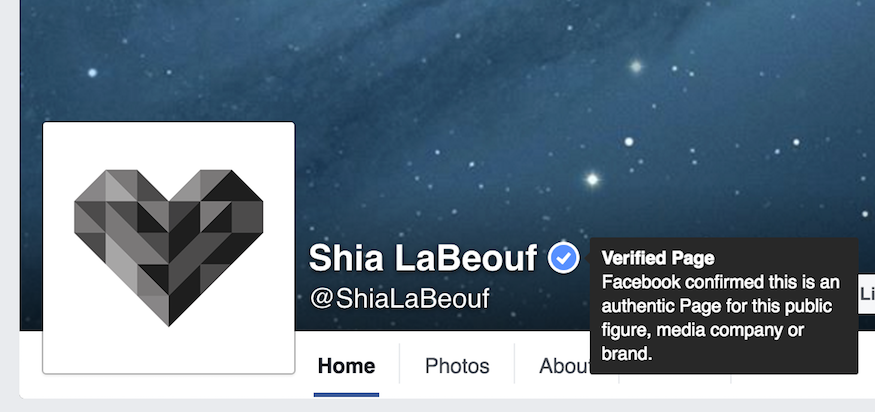
What About the Blue Checkmark?
The blue checkmark used to be reserved exclusively for celebrities, public figures, and major brands through a separate invitation-only process.
That’s no longer the case. Businesses and creators can now get the blue checkmark through both the free traditional verification and the paid Meta Verified subscription. The distinction between “celebrity blue” and “business gray” is gone. One badge, two paths to get it.
Which Facebook Verification Path Should You Choose?
For most small businesses, here’s how I think about it.
If your business has legitimate press coverage, a solid web presence, and proper documentation, try the free path first. It costs nothing and the badge is the same.
If you’ve been rejected on the free path, need verification quickly, or value having access to human support, Meta Verified is worth the monthly cost. For a local business, the Standard plan at $11.99 per month is reasonable insurance against impersonation and algorithm obscurity.
If you’re a larger brand managing multiple pages or worried about employee impersonation, the higher-tier plans start to make sense. Most small businesses won’t need them though.
NAP Consistency Still Matters
One thing from my original guide that hasn’t changed. Your business name, address, and phone number (known as NAP in the SEO world) need to be consistent everywhere. NAP consistency means that every place your business appears online shows the exact same contact information. Not close enough. Exact. If your Google listing says “Street” but your Facebook page says “St.” that’s a mismatch, and it matters. I cover this in more detail in my guide to NAP consistency and local SEO.
If your Facebook page says one address, your Google Business Profile says another, and your website lists a third, you’re creating confusion for both algorithms and customers. Inconsistent NAP information still hurts your local search visibility across platforms, not just on Facebook.
Before you start the verification process, audit your contact information. Make sure it matches across your website, Google Business Profile, Facebook page, and any directories where you’re listed. This is foundational local SEO work that pays dividends well beyond Facebook.
A complete local SEO audit can help you identify inconsistent listings, incomplete profiles, and website issues before you submit your verification request.
Verify Your Facebook Business Page and Move On
Facebook verification in 2026 isn’t the five-minute phone call it used to be. It’s either a documentation-heavy free application that requires demonstrated notability, or a paid subscription that still requires identity verification.
Neither path is complicated. Both require your business information to be accurate, your web presence to be functional, and your page to be active. If those things are in order, verification is straightforward. If they’re not, fix the foundation first.
If you want help getting your digital presence cleaned up before pursuing verification, or if you’re dealing with broader local SEO challenges, that’s what I do.
If your listings contain conflicting information or your business is struggling to appear consistently across search and social platforms, learn more about my local SEO help.